The error
Code: Error
Currency 'AUD' for Shop 'Storefront' was not found.
CommerceTermKey: InvalidShopCurrency
Root cause
The currency settings in Sitecore and the Commerce Engine do not match. The site name or currency configuration may be different between the two systems.
Solutions
1. Set the default currency to AUD in the Sitecore Content tree at Commerce Control Panel → Shared Settings → Currency Settings → Currency Sets → Default.
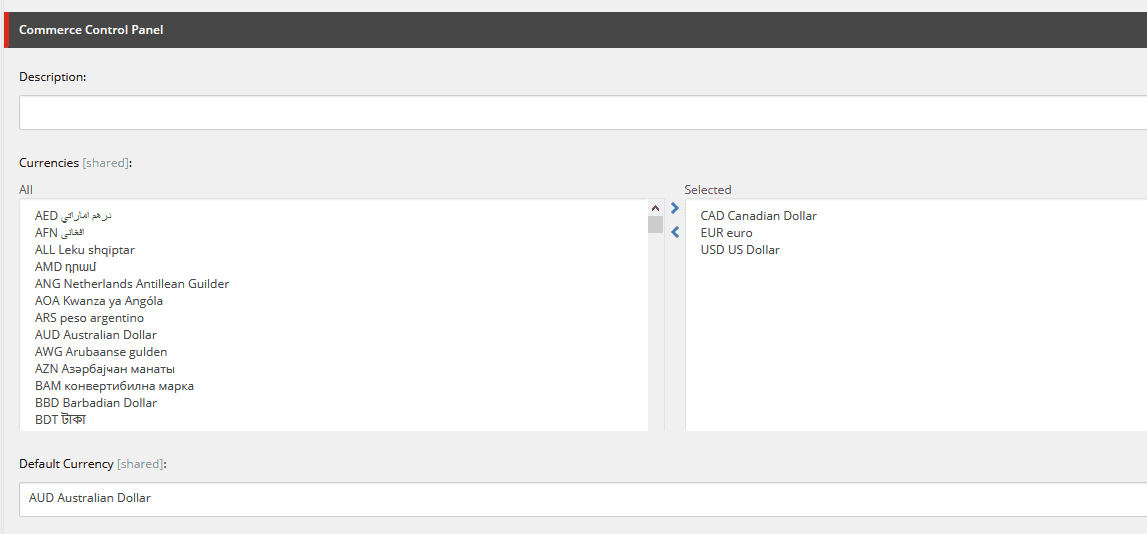
2. Open PlugIn.Content.PolicySet-1.0.0.json in the Commerce Authoring data/Environments folder and verify the Content PolicySet values. If BizFX is not available at https://localhost:4200, check this configuration as well.
{ "$type": "System.Collections.Generic.List`1[[Sitecore.Commerce.Core.Policy, Sitecore.Commerce.Core]], mscorlib",
  "$values": [
    { "$type": "Sitecore.Commerce.Plugin.Management.SitecoreConnectionPolicy, Sitecore.Commerce.Plugin.Management",
      "Host": "sxa.storefront.com",
      "SitecoreDatabase": "master",
      "UserName": "admin",
      "Domain": "sitecore",
      "Password": "xxxx",
      "ConnectionLeaseTimeout": 60000,
      "AuthRequestUrl": "sitecore/api/ssc/auth/login",
      "Protocol": "https" }
  ]
}
3. Check Sitecore.Commerce.Engine.Connect.config, or any patch file that overrides it, and verify the connection and shop settings:
<shopsServiceUrl>https://localhost:5000/api/</shopsServiceUrl>
<commerceOpsServiceUrl>https://localhost:5000/commerceops/</commerceOpsServiceUrl>
<commerceRequestTimeout>120</commerceRequestTimeout>
<enforceSsl>true</enforceSsl>
<defaultEnvironment>HabitatAuthoring</defaultEnvironment>
<defaultShopName>CommerceEngineDefaultStorefront</defaultShopName>
<defaultShopCurrency>USD</defaultShopCurrency>
Let me know which solution worked for you.